

If you are trying to log in to your MyCOMPASS PA Account, we can help. In this article, we will walk you through the steps to successfully complete the MyCOMPASS PA Account Login to apply for benefits, review the status of your application, or update your information.
In this post, we will cover:
- Information about MyCOMPASS PA Account
- MyCOMPASS PA Account Login log in Help
- MyCOMPASS PA Account Phone Number
- Get the MyCOMPASS PA Mobile App
- FAQs for MyCOMPASS PA Account
This guide is for Pennsylvania benefits applicants that have already created an online MyCOMPASS PA account. To find out how to login to your MyCOMPASS PA account, continue reading below.
MyCOMPASS PA Account
The Pennsylvania Department of Human Services (DHS) is responsible for administering government assistance benefits in Pennsylvania.
Currently, the Pennsylvania DHS manages the following benefit programs:
- Food Assistance Program (SNAP)
- Cash Assistance
- Health Care
The state uses the MyCOMPASS PA system to manage the benefits program online.
You can use the MyCOMPASS PA system to apply or reapply for food stamp benefits and the other benefits programs listed above.
To apply for Pennsylvania food stamp benefits or the other benefits programs online, you must first log in to your MyCOMPASS PA Account. For help on how to login to your online account, continue reading below.
MyCOMPASS PA Account Features
A MyCOMPASS PA account allows you to be able to perform the following tasks online:
- Apply For Pennsylvania Assistance Benefits
- Renew Benefits
- Check Status of your Pennsylvania Benefits Application
- Report A Change
- Find Local Offices
- Receive email notifications about your account
Here’s how to login to your MyCOMPASS PA Account
MyCOMPASS PA Account Login
To login to the MyCOMPASS PA online portal, follow the instructions below.
How to Login MyCOMPASS PA Online Account
If you are trying to log in to the MyCOMPASS PA online application to apply for benefits, check the status of your benefits, renew your benefits, or update your information, follow the steps provided below.
1. Visit the MyCOMPASS PA Website
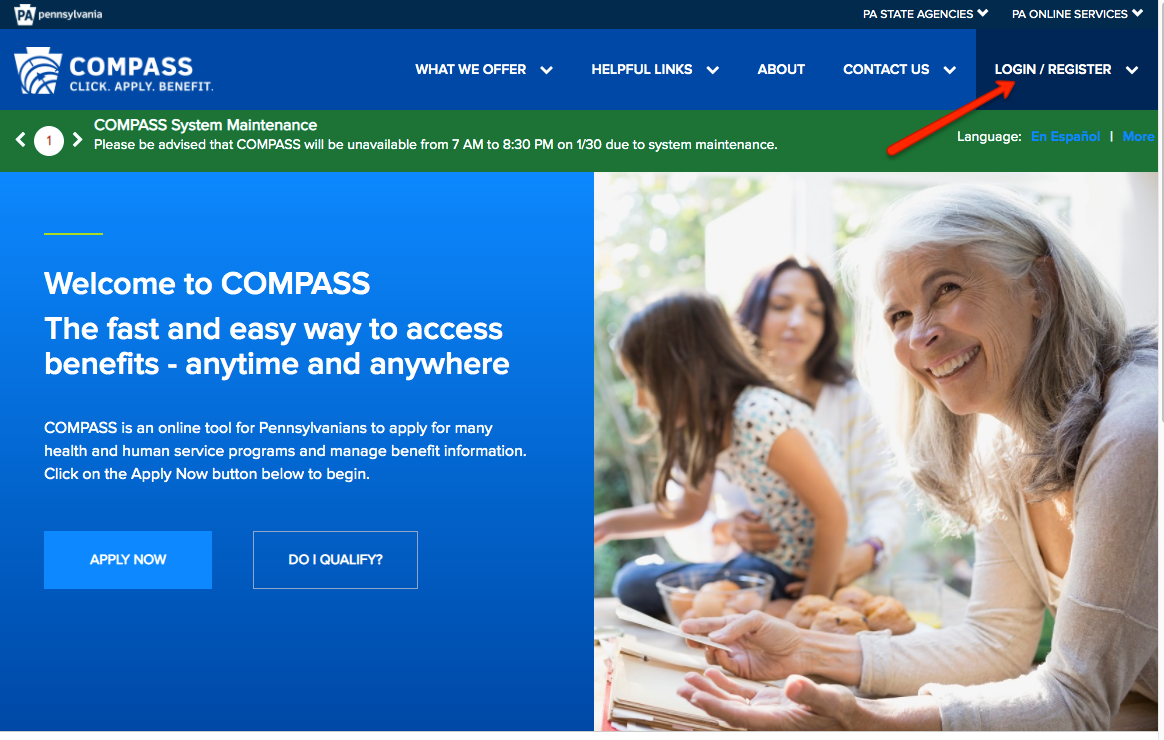
The first step when logging into your account is to visit the MyCOMPASS PA website. The website can be found at compass.state.pa.us/.
Once on the site, click the “LOGIN/REGISTER” link. For help, please refer to the screenshot below.
Next, you will see a drop-down menu. Locate the Individuals & Families section and click on the “Login” link under “Login/Register”.
2. Enter your Username & Password
Once you click the “Login/Register” link, you will be taken to the Login page.
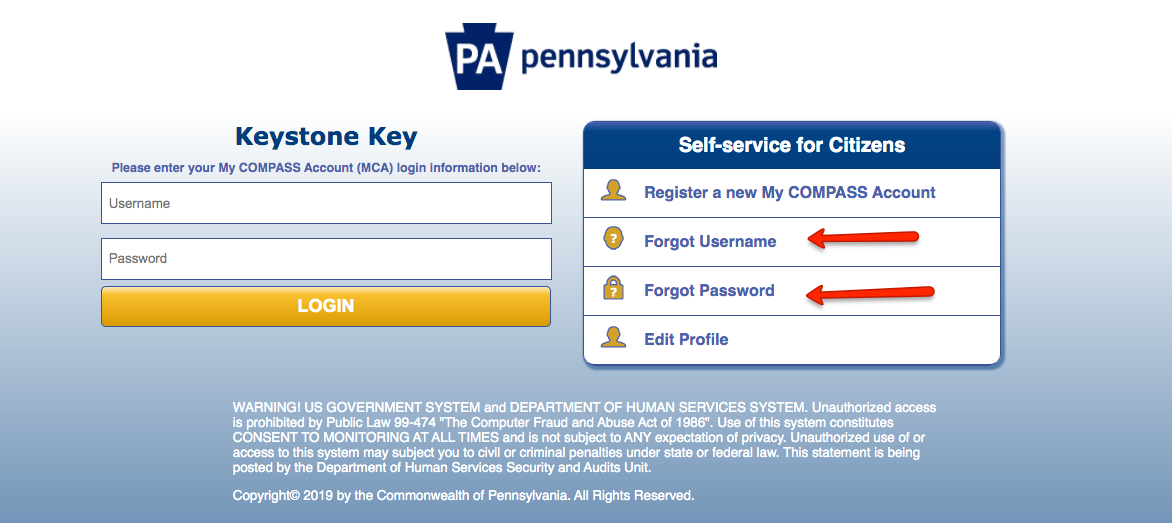
Next, enter your Username and Password into the login portal under “Keystone Key”.
For help, refer to the screenshot below.

3. Submit your MyCOMPASS PA Login Information
Once you have entered your information, click the “LOGIN” button to access your MyCOMPASS PA online account.
If you entered the correct information, you will be taken directly to your account.
MyCOMPASS PA Account Locked (Unlock your Account)
If you are having trouble logging into your MyCOMPASS PA account or your account is locked, here’s what to do:
There are two possible reasons why you may be having trouble logging into your account. You may have forgotten your username or password.
If you have forgotten your account username or password, click the “Forgot Username” or “Forgot Password” link as shown by the image below and follow the instructions on how to recover them.
If you are having issues getting your MyCOMPASS PA account unlocked, you can call the Pennsylvania DHS Customer Customer Call Center at the number below.
MyCOMPASS PA Phone Number
For further assistance with your MyCOMPASS PA account, call the Pennsylvania DHS Customer Customer Call Center at the number below:
1-800-692-7462
You can call between 8:30 a.m. and 4:45 p.m. Monday through Friday.
If you are hearing impaired, call TTY/TTD at 1-800-451-5886.
Customer service agents can assist you with problems accessing your account, including username and password issues.
For additional help with your MyCOMPASS PA account or benefits in general, including SNAP, read our frequently asked questions below.
Get the MyCOMPASS PA Mobile App
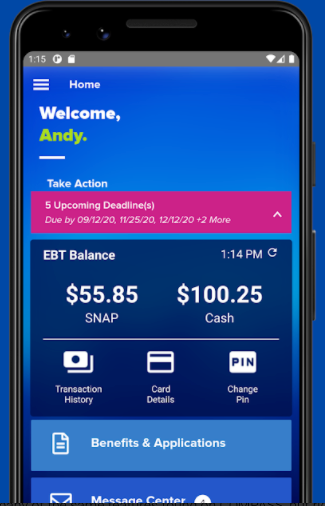
The MyCOMPASS PA Mobile Application and gain access your benefits from anywhere, at any time.
In addition, you can log into the app and review your benefits, check the status of submitted applications, upload documents, submit your Semi-Annual Reporting (SAR), and report changes directly from your phone.
The mobile app is easy to download.
You can download it here at the Apple Appstore for Apple devices or on Android’s Google Play store for Android devices.
MyCOMPASS PA Account FAQs
For additional questions regarding your MyCOMPASS PA Account, read our FAQs.
How can I apply for Food Stamp benefits in Pennsylvania?
There are 3 ways you can apply for food stamps in Pennsylvania.
Option 1 – Apply online
You can apply online through the MyCOMPASS PA Portal – as shown in the image below.
If you have an account, you can log in or create your MyCOMPASS PA account. Click here to be taken to the website.
Option 2 – Apply at DHS Office Near You
You can apply in person at the Pennsylvania Department of Human Services (DHS) office near you. Click here to locate a DHS office.
Option 3 – Download Pennsylvania Food Stamps Application
You can download an application, complete it, and mail it to your county DHS office or submit it in person.
Am I eligible for Pennsylvania Food Stamps?
To be eligible for Food Stamp benefits in Pennsylvania, you must meet certain eligibility requirements, including an asset and income limit (as described below).
For more on food stamps eligibility requirements and how to determine if you qualify, click here.
What is the Income Limit for Pennsylvania Food Stamps?
In order to be approved for SNAP benefits in Pennsylvania, you have to meet the income limits: gross income and net income.
Gross income is your total income, before taxes or any deductions.
Net income is determined by subtracting certain allowable deductions from the gross income.
Below is the Pennsylvania food stamps income limit table.
| Household Size | Gross monthly income (130 percent of poverty) |
Net monthly income (100 percent of poverty; test for SNAP households with elderly and disabled members) |
| 1 | $1,383 | $1,064 |
| 2 | $1,868 | $1,437 |
| 3 | $2,353 | $1,810 |
| 4 | $2,839 | $2,184 |
| 5 | $3,324 | $2,557 |
| 6 | $3,809 | $2,930 |
| 7 | $4,295 | $3,304 |
| 8 | $4,780 | $3,677 |
| Each additional member | (+486) | (+374) |
Households with members who are elderly or disabled, as well as households that pass the gross income test, must also pass a net test to qualify.
Elderly households are those which contain members age 60 or older.
Disabled members are those who receive disability payments, such as Supplemental Security Income (SSI), veteran’s disability, or Medicaid as a blind or disabled individual.
Can I save my Pennsylvania MyCOMPASS PA application if I’m not complete?
Yes, you can save your food stamps application in your account by clicking the “Save” button. Be sure to save your application tracking number before exiting the online application.
You can return to the application by logging back into your account.
Can Pennsylvania Food Stamps be used out of state?
Yes, you can use your Pennsylvania food stamps in other states. There are no rules against using your EBT card outside of Pennsylvania.
The Pennsylvania EBT Card will work at any store or ATM that accepts EBT cards in the United States, as well as the District of Columbia, the U.S. Virgin Islands, and Guam.
Can I use my Pennsylvania food stamps online?
Yes, you can.
The United States Department of Agriculture, the federal agency that oversees the food stamps program started the Online Purchasing Pilot in January 2017 with select retailers for the initial launch of the EBT Online Purchasing Pilot.
In June 2020, Pennsylvania was approved as part of the program.
As confirmed by the tweet below, this is a major win for Pennsylvania SNAP recipients, especially in the middle of the COVID-19 pandemic.
Hi there! Customers in the U.S. can pay for online orders from Aldi stores in Georgia, California, Florida, Illinois, Pennsylvania, and Texas with a valid EBT card, in full or in part. Please see more information on our growing EBT program here: https://t.co/YaXh9wbrbz -James
— Instacart (@Instacart) December 2, 2020
As a result of this decision, food stamps recipients can purchase food online and pay using their Pennsylvania EBT card for delivery and pick-up.
The program will initially start with Walmart and Amazon.
Additionally, as the Tweet above shows, you can use your Pennsylvania EBT card to shop online through Instacart for delivery.
Here’s the full list of participating retailers:
- Walmart
- Amazon
- Aldi
- Fresh Grocer
- ShopRite
How do I check my Pennsylvania EBT Card balance?
You can check the balance on your Pennsylvania EBT Card online, by phone, or in-person. For more help, check out our post here.
When Will my Pennsylvania Food Stamps Be Deposited?
In Pennsylvania, Food Stamp Benefits are deposited based on the last digit of your case number.
Here is the schedule by county of residence:
| County Name | Benefits are deposited based on the last digit of your case number |
| Adams | 5th business day of the month for all digits. |
| Allegheny | 1st business day of the month for digit 1. |
| Allegheny | 2nd business day of the month for digit 2. |
| Allegheny | 3rd business day of the month for digit 3. |
| Allegheny | 4th business day of the month for digit 4. |
| Allegheny | 5th business day of the month for digit 5. |
| Allegheny | 6th business day of the month for digit 6. |
| Allegheny | 7th business day of the month for digit 7. |
| Allegheny | 8th business day of the month for digit 8. |
| Allegheny | 9th business day of the month for digit 9. |
| Allegheny | 10th business day of the month for digit 0. |
| Armstrong | 4th business day of the month for all digits. |
| Beaver | 3rd business day of the month for all digits. |
| Bedford | 2nd business day of the month for all digits. |
| Berks | 4th business day of the month for digits 1,2,3,4 and 5. |
| Berks | 9th business day of the month for digits 6,7,8,9 and 0. |
| Blair | 1st business day of the month for digit 1. |
| Blair | 2nd business day of the month for digit 2. |
| Blair | 3rd business day of the month for digit 3. |
| Blair | 4th business day of the month for digit 4. |
| Blair | 5th business day of the month for digit 5. |
| Blair | 6th business day of the month for digit 6. |
| Blair | 7th business day of the month for digit 7. |
| Blair | 8th business day of the month for digit 8. |
| Blair | 9th business day of the month for digit 9. |
| Blair | 10th business day of the month for digit 0. |
| Bradford | 8th business day of the month for all digits. |
| Bucks | 1st business day of the month for digit 1. |
| Bucks | 2nd business day of the month for digit 2. |
| Bucks | 3rd business day of the month for digit 3. |
| Bucks | 4th business day of the month for digit 4. |
| Bucks | 5th business day of the month for digit 5. |
| Bucks | 6th business day of the month for digit 6. |
| Bucks | 7th business day of the month for digit 7. |
| Bucks | 8th business day of the month for digit 8. |
| Bucks | 9th business day of the month for digit 9. |
| Bucks | 10th business day of the month for digit 0. |
| Butler | 2nd business day of the month for all digits. |
| Cambria | 1st business day of the month for digit 1. |
| Cambria | 2nd business day of the month for digit 2. |
| Cambria | 3rd business day of the month for digit 3. |
| Cambria | 4th business day of the month for digit 4. |
| Cambria | 5th business day of the month for digit 5. |
| Cambria | 6th business day of the month for digit 6. |
| Cambria | 7th business day of the month for digit 7. |
| Cambria | 8th business day of the month for digit 8. |
| Cambria | 9th business day of the month for digit 9. |
| Cambria | 10th business day of the month for digit 0. |
| Cameron | 7th business day of the month for all digits. |
| Carbon | 3rd business day of the month for all digits. |
| Centre | 5th business day of the month for digits 1,2,3,4 and 5. |
| Centre | 7th business day of the month for digits 6,7,8,9 and 0. |
| Chester | 1st business day of the month for digit 1. |
| Chester | 2nd business day of the month for digit 2. |
| Chester | 3rd business day of the month for digit 3. |
| Chester | 4th business day of the month for digit 4. |
| Chester | 5th business day of the month for digit 5. |
| Chester | 6th business day of the month for digit 6. |
| Chester | 7th business day of the month for digit 7. |
| Chester | 8th business day of the month for digit 8. |
| Chester | 9th business day of the month for digit 9. |
| Chester | 10th business day of the month for digit 0. |
| Clarion | 5th business day of the month for all digits. |
| Clearfield | 6th business day of the month for digits 1,2,3,4 and 5. |
| Clearfield | 10th business day of the month for digits 6,7,8,9 and 0. |
| Clinton | 4th business day of the month for digits 1,2,3,4 and 5. |
| Clinton | 9th business day of the month for digits 6,7,8,9 and 0. |
| Columbia | 3rd business day of the month for all digits. |
| Crawford | 8th business day of the month for all digits. |
| Cumberland | 1st business day of the month for digits 1,2,3,4 and 5. |
| Cumberland | 7th business day of the month for digits 6,7,8,9 and 0. |
| Dauphin | 1st business day of the month for digit 1. |
| Dauphin | 2nd business day of the month for digit 2. |
| Dauphin | 3rd business day of the month for digit 3. |
| Dauphin | 4th business day of the month for digit 4. |
| Dauphin | 5th business day of the month for digit 5. |
| Dauphin | 6th business day of the month for digit 6. |
| Dauphin | 7th business day of the month for digit 7. |
| Dauphin | 8th business day of the month for digit 8. |
| Dauphin | 9th business day of the month for digit 9. |
| Dauphin | 10th business day of the month for digit 0. |
| Delaware | 1st business day of the month for digit 1. |
| Delaware | 2nd business day of the month for digit 2. |
| Delaware | 3rd business day of the month for digit 3. |
| Delaware | 4th business day of the month for digit 4. |
| Delaware | 5th business day of the month for digit 5. |
| Delaware | 6th business day of the month for digit 6. |
| Delaware | 7th business day of the month for digit 7. |
| Delaware | 8th business day of the month for digit 8. |
| Delaware | 9th business day of the month for digit 9. |
| Delaware | 10th business day of the month for digit 0. |
| Elk | 4th business day of the month for all digits. |
| Erie | 1st business day of the month for digit 1. |
| Erie | 2nd business day of the month for digit 2. |
| Erie | 3rd business day of the month for digit 3. |
| Erie | 4th business day of the month for digit 4. |
| Erie | 5th business day of the month for digit 5. |
| Erie | 6th business day of the month for digit 6. |
| Erie | 7th business day of the month for digit 7. |
| Erie | 8th business day of the month for digit 8. |
| Erie | 9th business day of the month for digit 9. |
| Erie | 10th business day of the month for digit 0. |
| Fayette | 1st business day of the month for digit 1. |
| Fayette | 2nd business day of the month for digit 2. |
| Fayette | 3rd business day of the month for digit 3. |
| Fayette | 4th business day of the month for digit 4. |
| Fayette | 5th business day of the month for digit 5. |
| Fayette | 6th business day of the month for digit 6. |
| Fayette | 7th business day of the month for digit 7. |
| Fayette | 8th business day of the month for digit 8. |
| Fayette | 9th business day of the month for digit 9. |
| Fayette | 10th business day of the month for digit 0. |
| Forest | 8th business day of the month for all digits. |
| Franklin | 1st business day of the month for digits 1,2,3,4 and 5. |
| Franklin | 7th business day of the month for digits 6,7,8,9 and 0. |
| Fulton | 4th business day of the month for all digits. |
| Greene | 2nd business day of the month for all digits. |
| Huntingdon | 6th business day of the month for all digits. |
| Indiana | 10th business day of the month for all digits. |
| Jefferson | 6th business day of the month for digits 1,2,3,4 and 5. |
| Jefferson | 10th business day of the month for digits 6,7,8,9 and 0. |
| Juniata | 4th business day of the month for all digits. |
| Lackawanna | 1st business day of the month for digits 1,2,3,4 and 5. |
| Lackawanna | 7th business day of the month for digits 6,7,8,9 and 0. |
| Lancaster | 1st business day of the month for digit 1. |
| Lancaster | 2nd business day of the month for digit 2. |
| Lancaster | 3rd business day of the month for digit 3. |
| Lancaster | 4th business day of the month for digit 4. |
| Lancaster | 5th business day of the month for digit 5. |
| Lancaster | 6th business day of the month for digit 6. |
| Lancaster | 7th business day of the month for digit 7. |
| Lancaster | 8th business day of the month for digit 8. |
| Lancaster | 9th business day of the month for digit 9. |
| Lancaster | 10th business day of the month for digit 0. |
| Lawrence | 4th business day of the month for digits 1,2,3,4 and 5. |
| Lawrence | 9th business day of the month for digits 6,7,8,9 and 0. |
| Lebanon | 6th business day of the month for all digits. |
| Lehigh | 1st business day of the month for digit 1. |
| Lehigh | 2nd business day of the month for digit 2. |
| Lehigh | 3rd business day of the month for digit 3. |
| Lehigh | 4th business day of the month for digit 4. |
| Lehigh | 5th business day of the month for digit 5. |
| Lehigh | 6th business day of the month for digit 6. |
| Lehigh | 7th business day of the month for digit 7. |
| Lehigh | 8th business day of the month for digit 8. |
| Lehigh | 9th business day of the month for digit 9. |
| Lehigh | 10th business day of the month for digit 0. |
| Luzerne | 6th business day of the month for digits 1,2,3,4 and 5. |
| Luzerne | 10th business day of the month for digits 6,7,8,9 and 0. |
| Lycoming | 4th business day of the month for digits 1,2,3,4 and 5. |
| Lycoming | 9th business day of the month for digits 6,7,8,9 and 0. |
| Mckean | 6th business day of the month for all digits. |
| Mercer | 1st business day of the month for digits 1,2,3,4 and 5. |
| Mercer | 7th business day of the month for digits 6,7,8,9 and 0. |
| Mifflin | 5th business day of the month for all digits. |
| Monroe | 4th business day of the month for digits 1,2,3,4 and 5. |
| Monroe | 9th business day of the month for digits 6,7,8,9 and 0. |
| Montgomery | 1st business day of the month for digit 1. |
| Montgomery | 2nd business day of the month for digit 2. |
| Montgomery | 3rd business day of the month for digit 3. |
| Montgomery | 4th business day of the month for digit 4. |
| Montgomery | 5th business day of the month for digit 5. |
| Montgomery | 6th business day of the month for digit 6. |
| Montgomery | 7th business day of the month for digit 7. |
| Montgomery | 8th business day of the month for digit 8. |
| Montgomery | 9th business day of the month for digit 9. |
| Montgomery | 10th business day of the month for digit 0. |
| Montour | 7th business day of the month for all digits. |
| Northampton | 1st business day of the month for digit 1. |
| Northampton | 2nd business day of the month for digit 2. |
| Northampton | 3rd business day of the month for digit 3. |
| Northampton | 4th business day of the month for digit 4. |
| Northampton | 5th business day of the month for digit 5. |
| Northampton | 6th business day of the month for digit 6. |
| Northampton | 7th business day of the month for digit 7. |
| Northampton | 8th business day of the month for digit 8. |
| Northampton | 9th business day of the month for digit 9. |
| Northampton | 10th business day of the month for digit 0. |
| Northumberland | 9th business day of the month for all digits. |
| Perry | 4th business day of the month for all digits. |
| Philadelphia | 1st business day of the month for digit 1. |
| Philadelphia | 2nd business day of the month for digit 2. |
| Philadelphia | 3rd business day of the month for digit 3. |
| Philadelphia | 4th business day of the month for digit 4. |
| Philadelphia | 5th business day of the month for digit 5. |
| Philadelphia | 6th business day of the month for digit 6. |
| Philadelphia | 7th business day of the month for digit 7. |
| Philadelphia | 8th business day of the month for digit 8. |
| Philadelphia | 9th business day of the month for digit 9. |
| Philadelphia | 10th business day of the month for digit 0. |
| Pike | 6th business day of the month for all digits. |
| Potter | 3rd business day of the month for all digits. |
| Schuylkill | 1st business day of the month for digit 1. |
| Schuylkill | 2nd business day of the month for digit 2. |
| Schuylkill | 3rd business day of the month for digit 3. |
| Schuylkill | 4th business day of the month for digit 4. |
| Schuylkill | 5th business day of the month for digit 5. |
| Schuylkill | 6th business day of the month for digit 6. |
| Schuylkill | 7th business day of the month for digit 7. |
| Schuylkill | 8th business day of the month for digit 8. |
| Schuylkill | 9th business day of the month for digit 9. |
| Schuylkill | 10th business day of the month for digit 0. |
| Snyder | 3rd business day of the month for all digits. |
| Somerset | 9th business day of the month for all digits. |
| Sullivan | 7th business day of the month for all digits. |
| Susquehanna | 9th business day of the month for all digits. |
| Tioga | 2nd business day of the month for all digits. |
| Union | 8th business day of the month for all digits. |
| Venango | 4th business day of the month for all digits. |
| Warren | 2nd business day of the month for all digits. |
| Washington | 5th business day of the month for digits 1,2,3,4 and 5. |
| Washington | 7th business day of the month for digits 6,7,8,9 and 0. |
| Wayne | 9th business day of the month for all digits. |
| Westmoreland | 6th business day of the month for digits 1,2,3,4 and 5. |
| Westmoreland | 8th business day of the month for digits 6,7,8,9 and 0. |
| Wyoming | 8th business day of the month for all digits. |
| York | 1st business day of the month for digit 1. |
| York | 2nd business day of the month for digit 2. |
| York | 3rd business day of the month for digit 3. |
| York | 4th business day of the month for digit 4. |
| York | 5th business day of the month for digit 5. |
| York | 6th business day of the month for digit 6. |
| York | 7th business day of the month for digit 7. |
| York | 8th business day of the month for digit 8. |
| York | 9th business day of the month for digit 9. |
| York | 10th business day of the month for digit 0. |
MyCOMPASS PA Account Login Summary
Here’s the bottom line:
To log into your account MyCOMPASS PA, visit compass.state.pa.us/ website and enter your UserName and Password.
If you are having trouble logging into your account or your account is locked, here’s what to do:
If you have forgotten your account UserName or password, click the “Forgot Username” or “Forgot Password” link and follow the instructions on how to recover them.
For further assistance with your MyCOMPASS PA account, call the Customer Call Center at the number at 1-800-692-7462.
Questions?
We hope this post on MyCOMPASS PA Account Login was helpful.
If you have further questions about the MyCOMPASS PA Account Login, PA Food Stamps, EBT Card, SNAP, or P-EBT, please let us know in the comments section below.
Be sure to check out our other articles about SNAP and EBT, including:
Free Admission with EBT in all 50 States
How to check ebtEDGE balance
ConnectEBT card balance
What you can buy with an EBT Card
How much in food stamps can I get?